
The Web AppBuilder retirement deadline is approaching, and local governments need a clear plan for the applications their staff and residents use every day.
Esri has extended the retirement of ArcGIS Web AppBuilder in ArcGIS Online to the second quarter of 2027. New Web AppBuilder applications can no longer be created, and after the November 2026 ArcGIS Online update, existing applications become view-only. When retirement is complete in 2027, existing Web AppBuilder applications in ArcGIS Online will no longer function.
The additional time provides a valuable migration window. It should be used to inventory applications, evaluate workflows, rebuild priority services, test replacement applications, and prepare users for the transition.
A successful migration requires more than reproducing the appearance of an old application. Local governments should determine what each application does, who depends on it, which integrations support it, and whether the original workflow still makes sense.
Understanding the Web AppBuilder Retirement Timeline
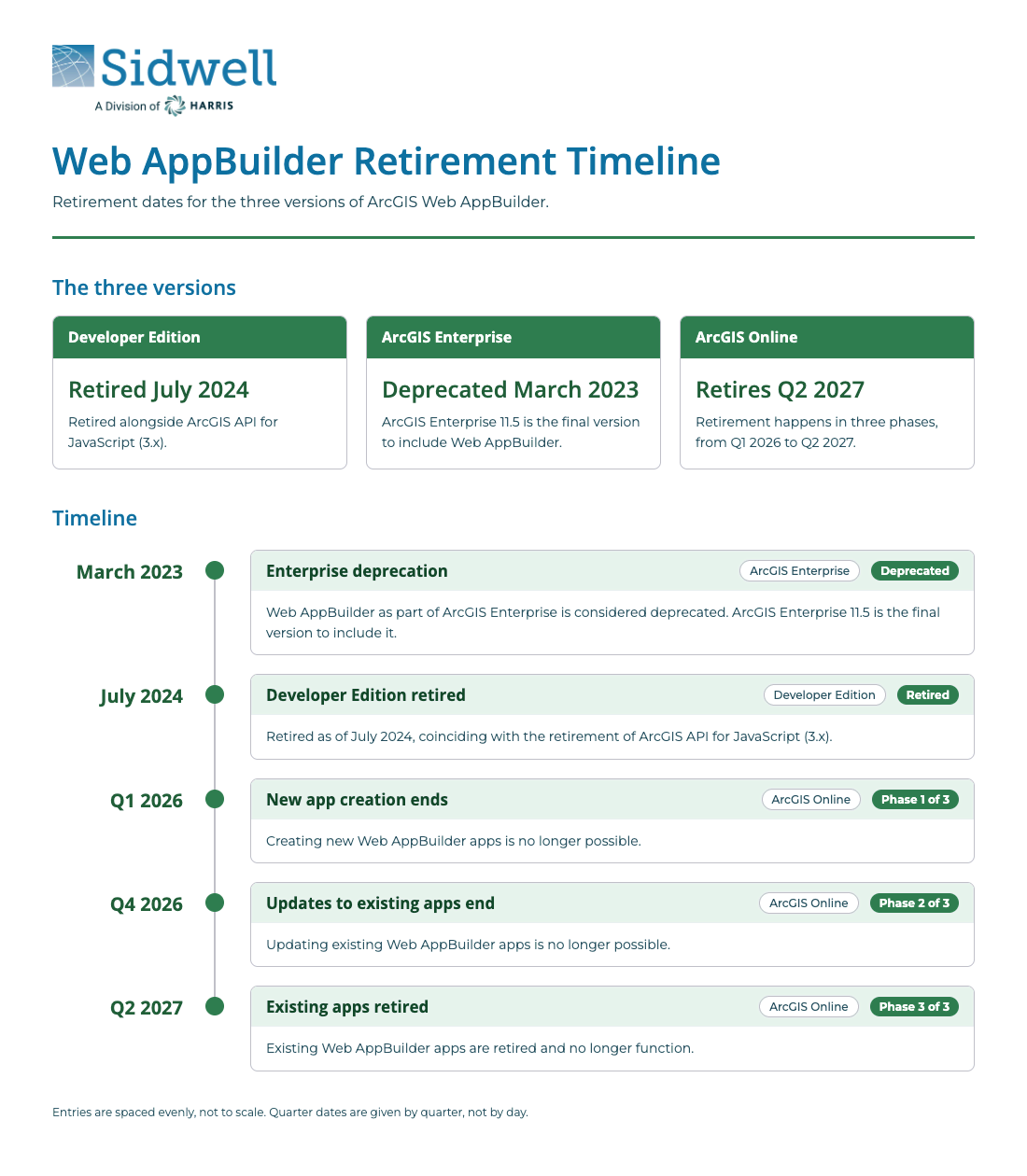
The Web AppBuilder retirement schedule varies based on how the application is deployed.
| Web AppBuilder environment | Retirement status |
|---|---|
| Developer Edition | Retired in July 2024 |
| ArcGIS Enterprise | ArcGIS Enterprise 11.5 was the final release to include Web AppBuilder |
| ArcGIS Online | New app creation ended in 2026, apps become view-only after the November 2026 update, and existing apps stop functioning in Q2 2027 |
The Developer Edition retirement coincided with the retirement of ArcGIS API for JavaScript 3.x. ArcGIS Enterprise 11.5 was the final Enterprise release to include Web AppBuilder. Starting with ArcGIS Enterprise 12.0, organizations will no longer be able to view, create, or edit Web AppBuilder applications.
Esri recommends ArcGIS Experience Builder as the primary migration path. However, Web AppBuilder applications cannot be converted automatically. Each application must be evaluated and reconfigured using Experience Builder or another appropriate ArcGIS solution.
Why Local Governments Should Act Now
Web AppBuilder applications often support critical public and internal services, including:
- Property searches
- Parcel and assessment viewers
- Planning and zoning inquiries
- Public safety operations
- Public works requests
- Utility mapping
- Election information
- Permitting workflows
- Capital project tracking
- Field inspections
- Open data access
- Internal departmental maps
Some applications may receive thousands of public visits each month. Others may be used by a small number of employees to complete essential operational tasks.
Waiting until the final retirement date creates several risks:
- Public applications may stop working.
- Embedded maps may disappear from government websites.
- Staff may lose access to established GIS workflows.
- Custom widgets may require more development than expected.
- Replacement applications may not have enough time for accessibility testing.
- Undocumented integrations may fail during migration.
- Departments may not have time to train users.
- Multiple applications may compete for limited staff capacity.
The Web AppBuilder transition should be coordinated with other modernization initiatives. Organizations still managing legacy desktop workflows can use Sidwell’s ArcMap migration guidance to evaluate dependencies across desktop, web, data, licensing, and staff training.
7 Essential Steps for Web AppBuilder Retirement Success
1. Create a Complete Application Inventory
Begin by identifying every Web AppBuilder application owned or used by the organization.
Do not limit the inventory to applications visible on the ArcGIS Online or ArcGIS Enterprise home page. Web AppBuilder applications may be embedded in department websites, linked from public documents, included in staff bookmarks, or shared through unlisted groups.
Record the following information for each application:
- Application name
- Item ID and URL
- Application owner
- Business owner or department
- ArcGIS Online or ArcGIS Enterprise environment
- Public or internal audience
- Approximate number of users
- Web maps and scenes
- Hosted and referenced layers
- Widgets
- Custom widgets or themes
- External systems and integrations
- Authentication requirements
- Website embeds and external links
- Accessibility requirements
- Current support contact
- Last update date
- Operational importance
Check for applications owned by former employees or inactive accounts. Ownership problems can delay migration or prevent staff from accessing essential configuration details.
Organizations with a large or poorly documented application portfolio may benefit from a broader GIS Strategic Enterprise Planning assessment.
2. Decide Which Applications to Rebuild, Replace, Consolidate, or Retire
Every Web AppBuilder application does not need a direct replacement.
Some applications were created for temporary projects. Others duplicate functionality available elsewhere. Several departmental viewers may use the same data and could potentially be consolidated into one application.
Assign each application to one of four categories:
Rebuild
The application supports an active workflow and should be recreated in Experience Builder or another supported platform.
Replace
The application remains necessary, but a different product may serve the workflow better. Depending on the requirements, the replacement could be ArcGIS Dashboards, Instant Apps, ArcGIS Hub, Survey123, Field Maps, or a purpose-built application.
Consolidate
Several applications provide similar information or serve overlapping audiences. Combine them into a shared application where the user experience and security requirements allow it.
Retire
The application is no longer used, contains outdated information, or supported a completed project. Archive any required records and remove obsolete links.
This assessment prevents teams from spending time rebuilding applications that deliver little operational value.
3. Document the Workflow Behind Each Priority Application
A screenshot does not explain how an application works.
Before rebuilding a priority application, document what the user needs to accomplish. Identify the sequence of searches, filters, selections, edits, reports, exports, prints, and external actions involved.
Interview the people who use or support the application. Ask:
- What task does this application help you complete?
- Who uses it?
- How frequently is it used?
- Which functions are essential?
- Which functions are rarely used?
- What causes confusion or support requests?
- What happens after a user finds a property or feature?
- Does the application pass information to another system?
- Does staff perform manual work behind the scenes?
- What information should be available on a mobile device?
- What would make the replacement easier to use?
This process frequently reveals that the desired replacement differs from the original application. The migration becomes an opportunity to remove unnecessary steps, clarify information, and improve how users complete the work.
Sidwell’s GIS consultation services can help organizations evaluate applications within their broader operational and technology environment.
4. Select the Right Replacement Application
ArcGIS Experience Builder is Esri’s recommended migration path for most Web AppBuilder applications. It supports flexible layouts, mobile optimization, 2D and 3D content, multiple pages, configurable widgets, and integration with other ArcGIS products.
Experience Builder will not always be the best choice for every application. Select the replacement based on the workflow.
| Application requirement | Potential solution |
|---|---|
| Flexible public or internal GIS application | ArcGIS Experience Builder |
| Simple, focused map experience | ArcGIS Instant Apps |
| Performance indicators and operational monitoring | ArcGIS Dashboards |
| Open data, initiatives, and public engagement | ArcGIS Hub |
| Form-based data collection | ArcGIS Survey123 |
| Mobile field data collection and editing | ArcGIS Field Maps |
| Public parcel, tax, and CAMA search | Sidwell Portico |
| Highly specialized workflow | Custom application development |
For public property information, Sidwell’s Portico GIS web application provides property search, mapping, tax and CAMA integration, data export, and configurable information displays.
Organizations should also determine whether the replacement will be deployed through ArcGIS Online or ArcGIS Enterprise. Security, data location, integrations, infrastructure, staffing, and licensing will influence that decision.
5. Map Widgets, Data, and Integrations
Web AppBuilder and Experience Builder use different architectures. A migration should include a detailed review of widgets, data sources, and external connections.
For every priority application, document:
- Standard widgets
- Custom widgets
- Custom themes
- Geoprocessing services
- Print services
- Locator services
- Routing services
- Queries and filters
- Editing rules
- Related tables
- Attachments
- Pop-ups and expressions
- Secured layers
- External URLs
- Authentication methods
- Connections to permitting, tax, CAMA, document, or asset systems
Some Web AppBuilder widgets have direct Experience Builder equivalents. Other capabilities may be provided through a combination of widgets, built-in map functions, or other ArcGIS applications. A small number of specialized widgets may require an alternative workflow or custom development.
Esri provides a functionality matrix and migration resources to help organizations compare Web AppBuilder and Experience Builder capabilities.
Custom widgets require special attention. Code written for Web AppBuilder Developer Edition and ArcGIS API for JavaScript 3.x cannot simply be copied into Experience Builder. The business requirement should be reviewed before deciding whether to redevelop the widget, replace it with standard functionality, or redesign the workflow.
6. Rebuild with Mobile Access, Accessibility, and Security in Mind
Recreating every screen exactly as it appeared in Web AppBuilder can carry old usability problems into the new application.
Use the migration to improve:
- Mobile and tablet layouts
- Navigation
- Search options
- Layer organization
- Pop-up content
- Page load performance
- Plain-language instructions
- Color contrast
- Keyboard navigation
- Form labels
- Screen-reader compatibility
- Alternative access to map information
- Authentication
- Sharing permissions
- Data exposure
- Download and export controls
Experience Builder allows creators to design layouts for different screen sizes. Mobile layouts still require deliberate configuration and testing. A desktop application should not be assumed to work well on a phone simply because it loads.
Public-facing applications should also be reviewed against current accessibility requirements. Sidwell’s public GIS accessibility checklist covers keyboard navigation, contrast, labels, screen readers, documents, mobile applications, and alternative access to map information.
Security should be tested at the item, layer, group, application, and identity levels. Confirm that public users cannot access internal data and that authenticated users retain access to the services required for their work.
7. Test, Launch, Train, and Decommission
Testing should reflect real-world tasks, not only whether the application opens.
Create test scenarios based on the workflows documented earlier. Ask departmental users and members of the intended audience to complete common tasks.
Testing should cover:
- Desktop computers
- Tablets and mobile phones
- Supported web browsers
- Public and authenticated access
- Search and filtering
- Pop-ups and related records
- Editing
- Printing and exporting
- Custom widgets
- External links
- Website embeds
- Load performance
- Accessibility
- Security permissions
- Error handling
Run the new and old applications in parallel where possible. This gives staff time to identify missing functionality and allows website owners to update links before the old application is removed.
Prepare a launch plan that includes:
- Final approval
- Application ownership
- Support responsibilities
- Staff training
- User instructions
- Public communication
- Website and document updates
- Redirects or replacement links
- Analytics and monitoring
- Retirement date for the old application
- Archiving requirements
After launch, monitor usage and support requests. Schedule a follow-up review to address problems and confirm that the replacement supports the intended workflow.
Local governments that need additional technical capacity can use Sidwell’s managed GIS services for application configuration, system administration, troubleshooting, training, and ongoing support.
Web AppBuilder Retirement Readiness Checklist
Use this checklist to evaluate your organization’s migration progress.
Application inventory
- All Web AppBuilder applications have been identified.
- Application URLs and item IDs have been recorded.
- Application and business owners have been confirmed.
- Public website embeds and external links have been documented.
- Inactive and former employee accounts have been reviewed.
- Usage and operational importance have been assessed.
Migration planning
- Each application has been classified for rebuilding, replacement, consolidation, or retirement.
- Priority applications have approved migration deadlines.
- Departmental stakeholders have been identified.
- Budget and staff capacity have been reviewed.
- ArcGIS Online and ArcGIS Enterprise requirements have been evaluated.
- Licensing requirements have been confirmed.
Workflow and technical assessment
- Essential user workflows have been documented.
- Web maps, scenes, layers, and tables have been inventoried.
- Standard and custom widgets have been recorded.
- External integrations have been identified.
- Authentication and sharing settings have been reviewed.
- Print, locator, routing, and geoprocessing services have been tested.
- Widget replacement options have been confirmed.
Application development
- The appropriate replacement platform has been selected.
- Mobile layouts have been configured.
- Accessibility requirements have been included.
- Security permissions have been validated.
- Data and service performance have been reviewed.
- Application ownership and maintenance responsibilities have been assigned.
Testing and launch
- Real-world test scenarios have been completed.
- Departmental users have approved the replacement.
- Multiple devices and browsers have been tested.
- Public and authenticated access have been verified.
- Staff training has been completed.
- Website links and embedded applications have been updated.
- Support and escalation procedures have been documented.
- The old application has a confirmed decommissioning date.
Frequently Asked Questions About Web AppBuilder Retirement
When will ArcGIS Web AppBuilder retire?
ArcGIS Web AppBuilder Developer Edition retired in July 2024. ArcGIS Enterprise 11.5 was the final Enterprise release to include Web AppBuilder. Web AppBuilder in ArcGIS Online is scheduled to retire in the second quarter of 2027.
What happens to existing Web AppBuilder applications?
After the November 2026 ArcGIS Online update, existing Web AppBuilder applications become view-only. When retirement is completed in Q2 2027, the applications will no longer function in ArcGIS Online.
Can Web AppBuilder applications be converted automatically?
No. Existing applications must be evaluated and reconfigured in ArcGIS Experience Builder or another appropriate application. Web maps and services may be reusable, but layouts, widgets, configurations, and custom code require review.
Is Experience Builder the only replacement?
Experience Builder is Esri’s recommended migration path for most applications. ArcGIS Instant Apps, Dashboards, Hub, Survey123, Field Maps, Portico, or custom development may be better suited to certain workflows.
Will custom Web AppBuilder widgets work in Experience Builder?
Custom Web AppBuilder widgets cannot be transferred directly. They were built on a different technology framework. Organizations should determine whether the capability can be replaced with a standard widget, redesigned, or redeveloped.
Should every Web AppBuilder application be rebuilt?
No. Applications with low usage, duplicate functionality, outdated data, or completed purposes may be consolidated or retired. The inventory and assessment process should determine where migration effort will produce the greatest value.
How long does a Web AppBuilder migration take?
The timeline depends on the number of applications, workflow complexity, custom widgets, integrations, accessibility requirements, and available staff. A simple viewer may be rebuilt quickly, while a business-critical application with custom functionality may require several months of planning, development, and testing.
How can Sidwell help?
Sidwell can assess Web AppBuilder applications, document workflows, recommend replacement platforms, configure Experience Builder applications, support ArcGIS Online and ArcGIS Enterprise, test accessibility, train staff, and provide ongoing GIS services.
Start the Web AppBuilder Migration Now
The Web AppBuilder retirement deadline leaves a limited window for local governments to replace applications that support public access and daily operations.
Start with an application inventory. Prioritize the services that residents and staff depend on. Document the underlying workflows, select the appropriate replacement, and allow enough time for testing and training.
Sidwell provides Esri implementation services, GIS consulting, application configuration, staff training, and ongoing support for local governments preparing for the transition.
Contact Sidwell to schedule a Web AppBuilder migration assessment and create a practical plan for moving your applications forward.